CPLai User Manual
Last reviewed November 15, 2026 (checked against the app).
This manual is available inside the app. On desktop, select the Help button (life-ring icon) in the title bar, next to the theme and notification controls. On web, open the Workspace tools (...) menu at the right of the top bar and choose Help for this page. Help is page-aware - it opens the guide for the page you are on. The Manual is also reachable from the Command Palette or directly at /docs/index.html on your CPLai server address. The rendered manual ships with the desktop app, so it remains available without a web connection.
CPLai is an AI command center for running companies, projects, persistent agents, multi-model chat, terminals, code-generation tools, workflows, and operational dashboards from one desktop or web interface. CPLai is the product; CloudPeakLabs is the company that builds it. This manual uses "CPLai" as shorthand for the product.
This manual documents current customer-visible behavior. A feature is described as desktop-only, web-only, or shared when the two interfaces differ. Planned behavior is kept separate from instructions for available features. Every page says at the top whether it describes the Core, an Add-on or Labs; What CPLai Is and Is Not explains the difference.
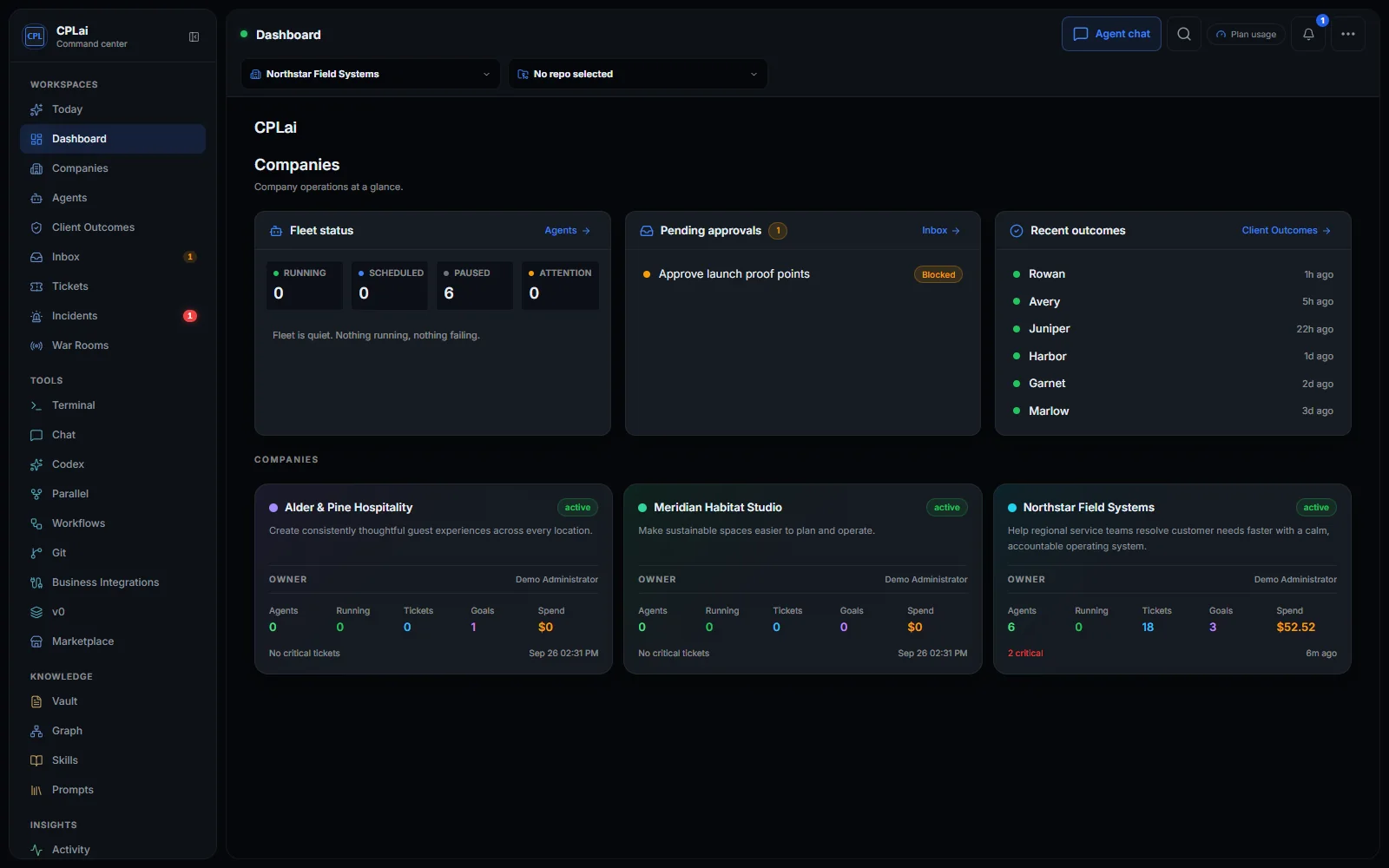
Screenshots in this manual show the web dashboard with a fictional demonstration company. Names, tickets and costs are illustrative.
Start here
New to CPLai? Read these four short pages in order - they take you from install to real work, and everything else in this manual is reference behind them:
- Quickstart - install to first useful result in about ten minutes.
- Run your first race - compare agents on one task and apply the best result.
- Hire your first agent - ongoing work that happens without you.
- Set up a project plan - phased execution for real features.
| If you want to... | Read... |
|---|---|
| Know what CPLai is for, who it suits, and what the core is | What CPLai Is and Is Not |
| Check which computers and devices CPLai runs on | Platform Support |
| Full install and configuration detail | Getting Started |
| Complete the first-launch setup wizard | Guided Onboarding |
| Understand every current page and route | Product Surface Map |
| Learn the keyboard shortcuts | Keyboard Shortcuts |
Core
The core is what CPLai is for: companies of agents working tickets in your repositories, the tools to watch and steer them, and the record of what they did. Every page in this group is labelled Core at the top.
Companies, agents and work
| Surface | What it does | Guide |
|---|---|---|
| Companies | Portfolio overview, company dashboards, teams, capabilities, projects, tickets, goals, knowledge, and users | Companies |
| Agents | Live fleet wall, agent creation, runs, chat, memory, schedules, teams, browser watch, and Keychain access | Agents |
| Hiring and schedules | Templates, team hiring, project scope, Awakening, and recurring schedules | Agent Hiring, Scheduling |
| Agent memory files | Managed AGENTS.md, CLAUDE.md, and GEMINI.md files |
Agent Memory Files |
| Inbox | Focused queue for tickets that need human action | Inbox |
| Tickets | Work tracking, ownership, comments, blockers, decomposition, and progress | Tickets |
| Projects | Repository workspaces, files, Git, plans, tickets, terminals, and phase execution | Projects and Plans, Project Setup |
Terminals, chat and code
| Surface | What it does | Guide |
|---|---|---|
| Terminal | Run Claude Code, Codex, and other AI CLIs side by side in sessions that survive a restart, see which one needs you, supervise them all at once, and give each task its own branch and worktree | Terminal, Development Workspaces |
| Council | Independent read-only model responses, evidence cross-critique, disagreement resolution, and one synthesis from a Terminal command | Council |
| Chat | Multi-model conversations, project context, tools, media generation, and conversation management | Chat |
| Tasks | Hand a coding task to any engine in its own copy of the project: steps, questions, changes, and what to do with the result | Tasks |
| Codex | Earlier sessions from the old Codex page | Codex |
| Parallel / Races | Run several agents on the same prompt, compare results, score runs, share results, and review metrics | Parallel Agent Racing |
| Git | Review repository state, stage files, commit, inspect branches and history, and manage pull requests | Git, Build Health |
| File Editor | Read and change project code beside your agents and terminals: Quick Open, project-wide search, agent code lenses, AI autocomplete, and inline AI edit | File Editor |
| App-wide features | Navigation shell, command palette, file browser, notifications, cross-page actions, and diagnostics | App-Wide Features |
Knowledge
| Surface | What it does | Guide |
|---|---|---|
| Vault | Browse, edit, search, and use vault notes as context | Vault |
| Graph | Explore linked vault notes and knowledge relationships | Knowledge Graph |
| Skills | Create, import, edit, evaluate, and assign reusable instruction packages | Skills and Prompts |
Usage, trust and access
| Surface | What it does | Guide |
|---|---|---|
| Billing | Compare usage value, actual spend, API-equivalent cost, providers, agents, and models | Usage and Costs |
| Agent ROI and AI Insights | Agent output against spend, run success, race winners, agent performance, and model profiles | AI Insights, Agent ROI |
| Trust Center | What agents did, what was stopped, alerts, safety rules, and the full record | Trust Center |
| Activity | Search and filter the unified operational event timeline | Activity |
| Status | Check the API connection, current server address, version, agent counts, and remote-access options | System Status |
| Models | Which models each provider offers, and what happens when one is retired | Models and Model Availability |
| Web dashboard | Use the browser dashboard, the phone layout, and remote access | Web Dashboard and Remote Access |
| Assistant connection | Connect Claude Code, Claude Desktop or Codex to CPLai as you: client setup, device codes, tools, revocation, and audit | Assistant Connection (MCP) |
| Docker environments | Sandboxed agents in local or remote containers, connection tests, Camofox profiles, and troubleshooting | Docker Environments |
Comes with a team
These dashboards appear in a company when you hire the team for that work.
| Surface | What it does | Guide |
|---|---|---|
| Engineering | Engineering capability overview, roadmap, bugs, security, and merge queue | Engineering Dashboard, Engineering Roadmap |
| Content | Content pipeline, calendar, review queue, media, and publishing state | Content Dashboard |
Add-ons
Add-ons are optional surfaces for particular kinds of work. Use the ones your work needs and ignore the rest. Every page in this group is labelled Add-on at the top.
| Surface | What it does | Guide |
|---|---|---|
| Chief of Staff | The optional personal assistant that watches your mail and CPLai work, and fills the Today page | Chief of Staff |
| Client Outcomes | Client reviews (prototype delivery links with client feedback and versions) plus client-safe run summaries | Client Outcomes |
| Designer | Describe a page and build it on any model you can run, with a live preview, versions and client review (the former v0 page) | Designer |
| Goals | Company objectives, nested goals, ticket-derived progress, and permissions | Goals |
| Incidents and War Rooms | Run outage command and live human-agent rooms with streaming replies, persistent threads, multi-agent chains, presence, and optional incident links | Incident Command and War Rooms |
| Workflows | Author and run workflows in YAML or the visual builder, inspect step graphs, and review execution history | Workflows |
| Business Integrations | Agent mailboxes, Property Monitor, Calendar, Intake Forms, and Migration Assistant | Business Integrations |
| Marketplace | Install Company Packs (agents, skills, teams, goals) from the registry, or prepare a compatible pack for publication | Marketplace, Company Pack Format v1 |
| Prompts | Create reusable prompt templates and send them into Chat | Skills and Prompts |
| Image, Video, and Voiceover | Hosted media tools, ElevenLabs audio jobs, and the desktop media studio | Image, Video, and Voiceover |
| Local Models | Connect Ollama or vLLM, manage downloads and context memory, and choose an agent execution harness | Local Models |
| Agent Travel | Moving agents and teams to another paired machine and home again, and copying Keychain items between machines | Agent Travel |
| CPL Browser | Let chats, agent chats and terminal tabs work in your own signed-in browser | CPL Browser |
| Chrome Extension | Clip pages to CPLai, quick-ask agents, and see ticket badges on GitHub PRs | Chrome Extension |
| Running CI on your own hardware | Self-hosted GitHub Actions runners for fleet-driven CI volume: registration, workflow changes, resource guards, and fallback | Running CI on Your Own Hardware |
| Automation Services | Advanced, API-first mission, release, decision, truth, workforce, and company-snapshot services for trusted integrations | Automation Services |
Labs
Labs are not finished yet. Each page says what is missing.
| Surface | What it does | Guide |
|---|---|---|
| Xeneon Edge widgets | Owner-only Mission Control, Agent Control, and Living Graph surfaces on a Corsair Xeneon Edge | Xeneon Edge Widgets |
| Voice Approval | A phone call that asks you to approve a high-stakes agent action | Voice Approval |
| Local ComfyUI runtime | The managed local image runtime | Image, Video, and Voiceover |
Administration
| Guide | Covers |
|---|---|
| Settings | Every setting, in one page per section: Appearance, Plan & costs, Chat, Terminal, Agents, Utility models, Knowledge & memory, Integrations, Files & storage, Developer tools, and About & updates |
| Web Administration | Global users, permission profiles, credential security, data export, and audit replay |
| Keychain | Shared credentials, company grants, agent grants, and entry types |
Important product boundaries
- The desktop app and web dashboard share most operational data, but they are not identical. Each guide labels meaningful differences.
- CPLai uses PostgreSQL for platform data. Project repositories, vault files, generated media, and agent workspaces remain filesystem-backed.
- Claude Code, Codex, Antigravity, and opencode are separate runtimes with different authentication and billing behavior. Read the relevant agent, terminal, or race guide before choosing one.
- Council is read-only deliberation; Parallel Racing is competing execution. Use Council when you want one evidence-backed decision and Parallel Agent Racing when you want implementations to compare and pick.
- Public race shares, benchmark cards, and spectate links expose only the redacted content represented by the generated link. Treat any public link as shareable until it expires or is revoked.
Find help quickly
Use the page-aware Help button (desktop title bar) or Help for this page (web Workspace tools menu) when you are already inside a CPLai surface. Use the Product Surface Map when you know the page or route but are not sure which guide covers it. Each page also links to related guides and troubleshooting steps.