Settings: Terminal
Last reviewed November 15, 2026 (checked against the app).
These settings are in Settings -> Terminal on desktop and web. All settings lists every section.
How do I configure the terminal?
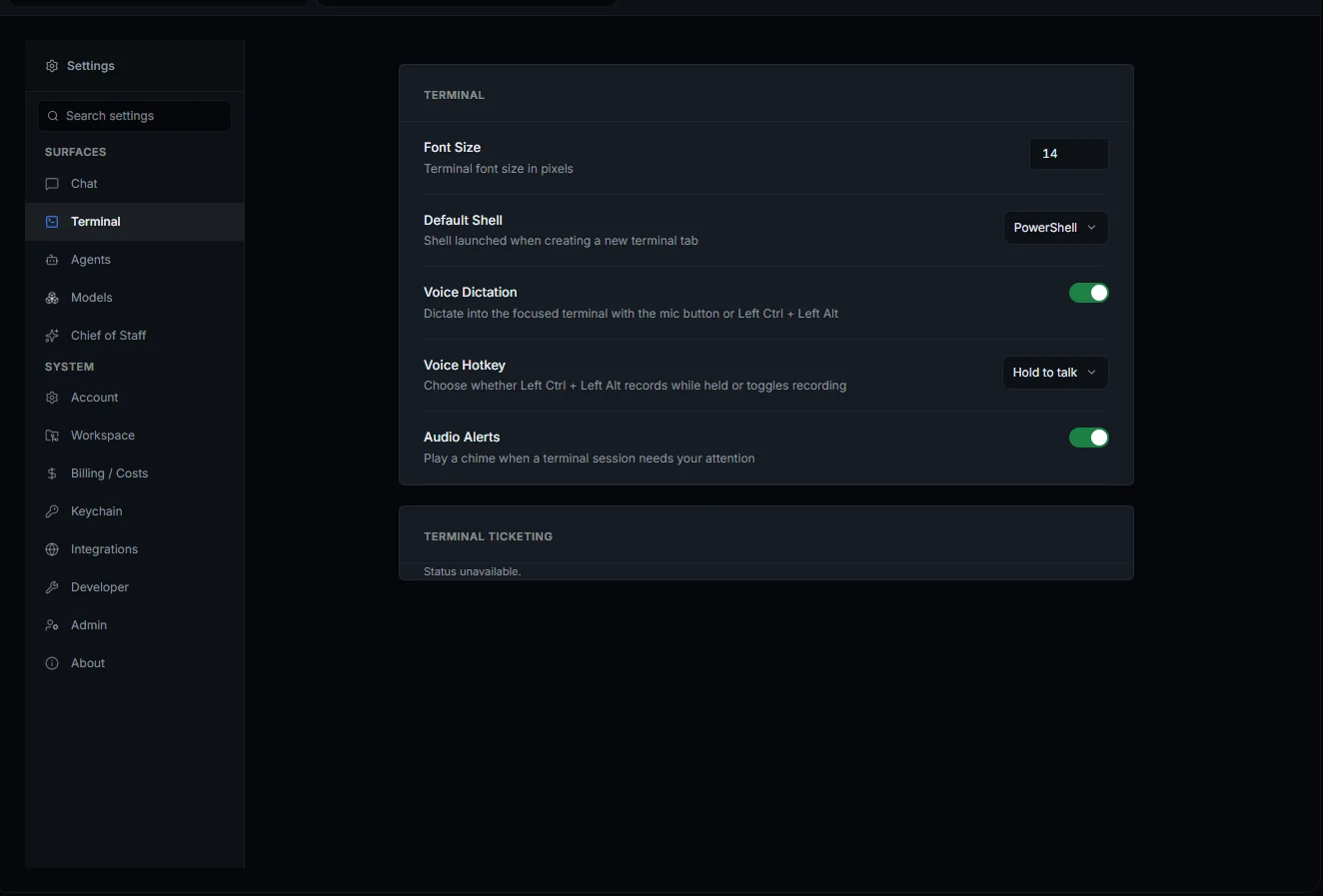
Open Settings -> Terminal.
| Setting | What it controls |
|---|---|
| Font Size | Terminal text size |
| Default Shell | Shell launched for new terminal tabs |
| Voice Dictation | Enables the mic button and Left Ctrl + Left Alt terminal dictation shortcut |
| Voice Hotkey | Uses Left Ctrl + Left Alt as hold-to-talk or toggle recording |
| Audio Alerts | Chime when a terminal session needs attention |
Both the desktop app and the web dashboard expose these controls. Font size changes apply immediately to all open terminal tabs without a reload. The default shell sets what opens when you create a new tab. Both apps offer PowerShell, Bash, CMD, Claude Code, Codex, and Antigravity (agy). Completion Notifications (a toast when a background terminal finishes or prompts) is a desktop-only row.
Voice dictation writes the recognized text to the focused Terminal or Codex prompt only. It does not press Enter or auto-execute commands. When an OpenAI key is configured, desktop dictation uses Whisper; otherwise it falls back to browser speech recognition where available.
How do I choose whether terminal tabs get their company's Keychain?
Open Settings -> Terminal and find Give terminal tabs their company's Keychain (desktop or web). It is on by default. Only you can turn it on or off: agents and API keys cannot change it.
| Position | What a new terminal tab gets |
|---|---|
| On | The Keychain entries linked to its company, the company of the project folder it opens in, as environment variables. CPLai hides their values in what it shows and keeps. A folder that belongs to no project gets none. |
| Off | No Keychain entries. |
A tab that is already open keeps what it got when it started. While the page reads the setting the row says Checking. If the read fails it says Could not read, tells you the setting may be on, and offers Try again.
What Keychain entries does a terminal tab get? lists what a tab is never given and how it tells you.
How do I set up Terminal Ticketing?
Open Settings -> Terminal -> Terminal Ticketing (desktop or web).
CPLai ships a coordination helper, cpl.ps1, that lets any interactive terminal session (Claude Code, Codex, opencode) read and write the ticket board with proper attribution: cpl inbox, cpl ticket <id>, cpl comment <id> "...", cpl done <id>, and related verbs. The helper self-deploys to %ProgramData%\CloudPeakLabs\bin\cpl.ps1 at every service boot, so it is always current.
A terminal tab CPLai opens already carries the Console identity of its project's company (CPL_AGENT_ID and CPL_COMPANY_ID), so board writes there are attributed with no setup. Shells CPLai did not start need a standing identity: the Terminal Ticketing card's single button finds or creates a dedicated Console agent and writes ~/.cpl-identity.json for the current user, and the helper attributes terminal work to Console instead of borrowing a real agent's identity. That file names one company, so it is used only when the shell has no injected identity and the file's company matches; it never stands in for another company's Console. An existing identity file is never overwritten.